> For the complete documentation index, see [llms.txt](https://wpdocs.gitbook.io/suseio/llms.txt). Markdown versions of documentation pages are available by appending `.md` to page URLs; this page is available as [Markdown](https://wpdocs.gitbook.io/suseio/setting/color.md).

# Color

**Step 1** - You can go to the Elementor and edit page.

<figure><img src="https://3862247698-files.gitbook.io/~/files/v0/b/gitbook-x-prod.appspot.com/o/spaces%2F2ylPLCCgSZIfFaX40GX5%2Fuploads%2FPkhYa75WFU1FqfSneIC2%2FScreenshot%202024-12-07%20at%2014.34.01.png?alt=media&amp;token=e6f55873-9299-46e0-8789-b7ea83133b5d" alt=""><figcaption></figcaption></figure>

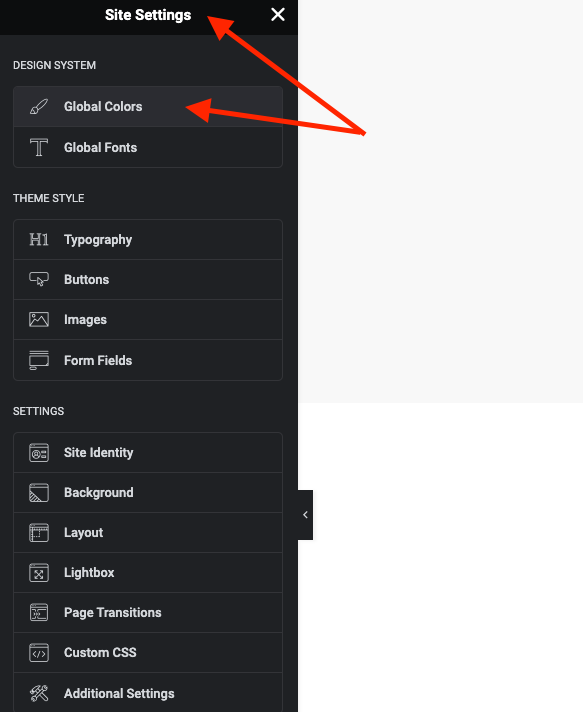
**Step 2** - Site Settings >> Global Colors >>

<figure><img src="https://content.gitbook.com/content/2ylPLCCgSZIfFaX40GX5/blobs/sLCUr2Q97Gtp14JEhJqN/Screenshot%202024-02-27%20at%2009.51.19.png" alt=""><figcaption></figcaption></figure>

<figure><img src="https://3862247698-files.gitbook.io/~/files/v0/b/gitbook-x-prod.appspot.com/o/spaces%2F2ylPLCCgSZIfFaX40GX5%2Fuploads%2Fn7osp4pJqkKjX0M3Ifby%2FScreenshot%202024-12-07%20at%2014.36.04.png?alt=media&amp;token=f63a0a85-caf8-4cb6-80a3-680118b74950" alt=""><figcaption></figcaption></figure>

**Step 3** - Settings color for your site

1. **The Primary Color** is the main color of your site.

* Regular: original color
* Hover: color when hovering items

&#x20;Example: Color Button, Color Link, and some other places.

2\. **Secondary** (**Heading) Color** is the color of the heading text.

&#x20;Example: Color Title, Title Tab ...

&#x20;3\. **Text Color** is the color of the content text.

&#x20;Example: Color content, description ... in a single blog, single product, page ...

4\. **Accent** **Color** is the color of the content text.

&#x20;5\. **Border Color** is the color border block.

&#x20;Example: border product block, border form input, and places with borders ...

&#x20;6\. **Light Color** is the color light used for sub-description.

&#x20;Example: Color categories, color date-time, color subtitle ...

7\. **Dark Color** is the color light used for sub-description.

8\. **Background field** **Color** is the color Background field used for sub-description.

9\. **Stripe Gradient** 1.

10\. **Stripe Gradient** 2 .

11\. **Stripe Gradient** 3 .

12\. **Stripe Gradient** 4 .

<figure><img src="https://3862247698-files.gitbook.io/~/files/v0/b/gitbook-x-prod.appspot.com/o/spaces%2F2ylPLCCgSZIfFaX40GX5%2Fuploads%2F6fAMe73BHbF6PnTmh6Gz%2FScreenshot%202024-12-07%20at%2014.37.40.png?alt=media&amp;token=243d1046-4d0d-4081-bb8c-1a917827b9a5" alt=""><figcaption></figcaption></figure>

* You use the available Edit Elementor class as the example below, you will have a color mixing gradient .
* Class "suseio-stripe-gradient" .

<figure><img src="https://3862247698-files.gitbook.io/~/files/v0/b/gitbook-x-prod.appspot.com/o/spaces%2F2ylPLCCgSZIfFaX40GX5%2Fuploads%2F9ZXTGSFZR41KUTeDCIlc%2FScreenshot%202024-12-12%20at%2008.57.42.png?alt=media&amp;token=8ffb9b78-5c42-49b0-9169-1e512caace09" alt=""><figcaption></figcaption></figure>

* Gradient color&#x20;

<figure><img src="https://3862247698-files.gitbook.io/~/files/v0/b/gitbook-x-prod.appspot.com/o/spaces%2F2ylPLCCgSZIfFaX40GX5%2Fuploads%2FRRgLZyFtBY51LfVueC9a%2FScreenshot%202024-12-12%20at%2008.56.41.png?alt=media&amp;token=94f3bfd0-265b-4098-b09b-f02235b9c15b" alt=""><figcaption></figcaption></figure>

<figure><img src="https://3862247698-files.gitbook.io/~/files/v0/b/gitbook-x-prod.appspot.com/o/spaces%2F2ylPLCCgSZIfFaX40GX5%2Fuploads%2FR7IXmp2WV85EC5JrHPnS%2FScreenshot%202024-12-12%20at%2009.01.45.png?alt=media&amp;token=48de3765-9d8b-4422-b402-d775babe1984" alt=""><figcaption></figcaption></figure>

Note: Color is sometimes used for many special places to see which colors apply correctly to what cases you can select and test.