# Breadcrumb

**Step 1** Go to WordPress Dashboard > Appearance > Breadcrumb > Add New

<figure><img src="https://1067416430-files.gitbook.io/~/files/v0/b/gitbook-x-prod.appspot.com/o/spaces%2FwlTStQZOwgDUXNvGAAWK%2Fuploads%2Fi3PLXiMHGHalK89HBA7H%2FScreenshot%202024-10-28%20at%2009.27.25.png?alt=media&#x26;token=62cd8e35-1d74-481c-b539-8982228908a2" alt=""><figcaption></figcaption></figure>

<figure><img src="https://1067416430-files.gitbook.io/~/files/v0/b/gitbook-x-prod.appspot.com/o/spaces%2FwlTStQZOwgDUXNvGAAWK%2Fuploads%2FesKsWME3p0hK9xnswkP1%2FScreenshot%202024-10-28%20at%2009.28.08.png?alt=media&#x26;token=868e68e0-837a-4f68-a2d8-670bf31c3917" alt=""><figcaption></figcaption></figure>

<figure><img src="https://1067416430-files.gitbook.io/~/files/v0/b/gitbook-x-prod.appspot.com/o/spaces%2FwlTStQZOwgDUXNvGAAWK%2Fuploads%2FWw8ryIQKnLYFQGQGyyCR%2FScreenshot%202024-10-28%20at%2009.28.54.png?alt=media&#x26;token=2740223d-bf44-40d5-bc54-90ab0bc20c38" alt=""><figcaption></figcaption></figure>

**Step 2** Click ‘Add New ’ and Name your Breadcrumb template and click ‘Create Breadcrumb’ and 'update'.

<figure><img src="https://1067416430-files.gitbook.io/~/files/v0/b/gitbook-x-prod.appspot.com/o/spaces%2FwlTStQZOwgDUXNvGAAWK%2Fuploads%2FXJXGNvvyIccQF949uQ9E%2FScreenshot%202024-10-28%20at%2009.30.44.png?alt=media&#x26;token=c74411bb-8672-481c-9eea-73a9b519a5d6" alt=""><figcaption></figcaption></figure>

<figure><img src="https://1067416430-files.gitbook.io/~/files/v0/b/gitbook-x-prod.appspot.com/o/spaces%2FwlTStQZOwgDUXNvGAAWK%2Fuploads%2Fat8Oqho5AA5IUZ0ypcLT%2FScreenshot%202024-10-28%20at%2009.31.45.png?alt=media&#x26;token=e4fedbb0-b90f-4e71-a1c3-f65642fd7ec4" alt=""><figcaption></figcaption></figure>

**Step 3** - Drag or drop  the element that you want to build your template style with a limited layout

You can add "**Neotech** Breadcrumb"

<figure><img src="https://1067416430-files.gitbook.io/~/files/v0/b/gitbook-x-prod.appspot.com/o/spaces%2FwlTStQZOwgDUXNvGAAWK%2Fuploads%2F4bAoRLaeiKgvQTFIwTYK%2FScreenshot%202024-10-28%20at%2009.32.14.png?alt=media&#x26;token=2040e28f-d720-41bb-8bb4-5804d64e8f05" alt=""><figcaption></figcaption></figure>

After all, click **"Update"** for settings.

**Step 4 - Set up Breadcrumb**

* &#x20;Choose tab **Breadcrumb** and you can add the template that has been created to the page.

<figure><img src="https://1067416430-files.gitbook.io/~/files/v0/b/gitbook-x-prod.appspot.com/o/spaces%2FwlTStQZOwgDUXNvGAAWK%2Fuploads%2FvbaIvek3jsRxxThN41sN%2Fimage.png?alt=media&#x26;token=c7c91386-b9d3-4ec6-9b5d-dee24014c1f3" alt=""><figcaption></figcaption></figure>

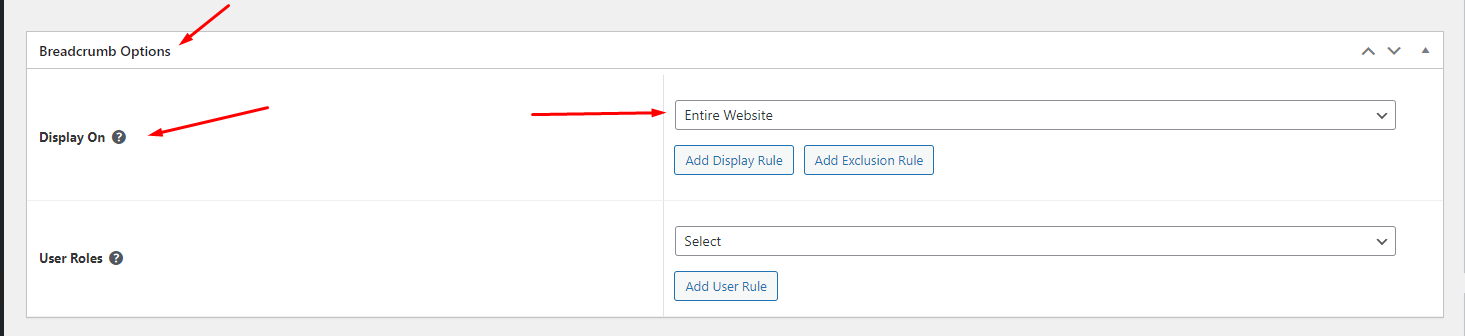
* Edit the display of your Breadcrumb Template that can add the created template to the page.

<figure><img src="https://content.gitbook.com/content/wlTStQZOwgDUXNvGAAWK/blobs/pwuMvktLAHh5WbzUtkiG/Screenshot_7.png" alt=""><figcaption></figcaption></figure>

**Step 5** Click SAVE & CLOSE

After all, click **"Update"** for settings.