# Breadcrumb

**Step 1** Go to WordPress Dashboard > Appearance > Breadcrumb > Add New

<figure><img src="https://1317622182-files.gitbook.io/~/files/v0/b/gitbook-x-prod.appspot.com/o/spaces%2FHaJY7xtpjFYpIG1vHKlm%2Fuploads%2FT4DSHjUOxPyVwWPxzsGa%2FScreenshot%202025-09-23%20at%2016.05.45.png?alt=media&#x26;token=2bc92350-4d1c-49e6-b60a-3cc8b424ca09" alt=""><figcaption></figcaption></figure>

<figure><img src="https://1317622182-files.gitbook.io/~/files/v0/b/gitbook-x-prod.appspot.com/o/spaces%2FHaJY7xtpjFYpIG1vHKlm%2Fuploads%2FauP9QtAulSrAEYMO1BUq%2FScreenshot%202025-09-23%20at%2016.06.12.png?alt=media&#x26;token=eedcaa77-fdbd-4fb9-8292-9323320d9029" alt=""><figcaption></figcaption></figure>

<figure><img src="https://content.gitbook.com/content/HaJY7xtpjFYpIG1vHKlm/blobs/kvKIgLY5V1Ln1rt8XgGr/Screenshot_32.jpg" alt=""><figcaption></figcaption></figure>

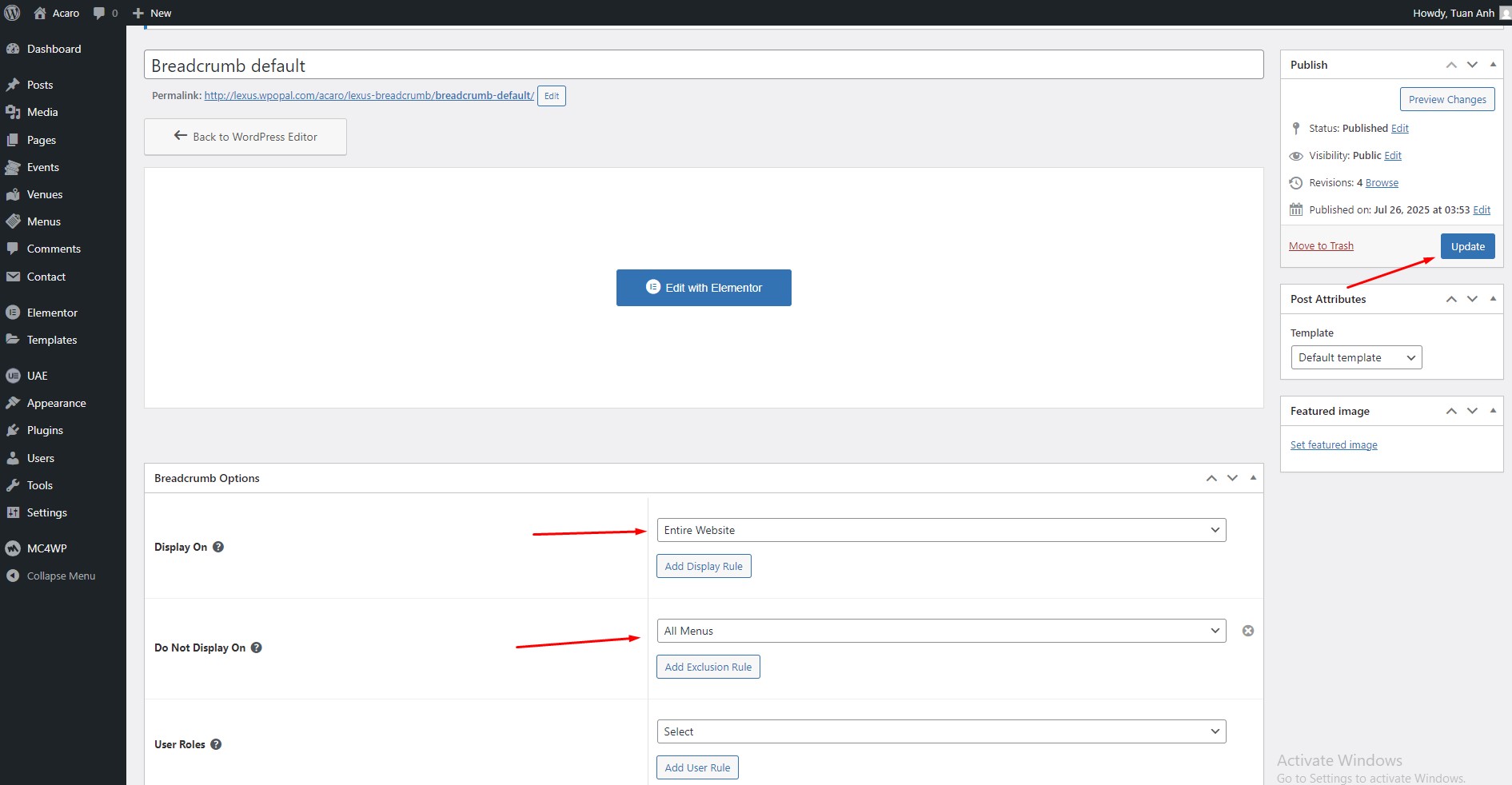
**Step 2** Click ‘Add New ’ and Name your Breadcrumb template and click ‘**Acaro** Breadcrumb’ and 'update'.

<figure><img src="https://1317622182-files.gitbook.io/~/files/v0/b/gitbook-x-prod.appspot.com/o/spaces%2FHaJY7xtpjFYpIG1vHKlm%2Fuploads%2F0CPE54LHZPPUDd3pza7W%2FScreenshot%202025-09-23%20at%2016.07.37.png?alt=media&#x26;token=32a4e279-42a8-4d6e-9abe-3addd3da4668" alt=""><figcaption></figcaption></figure>

<figure><img src="https://1317622182-files.gitbook.io/~/files/v0/b/gitbook-x-prod.appspot.com/o/spaces%2FHaJY7xtpjFYpIG1vHKlm%2Fuploads%2F9LXTTlqOZF4WESOEK7MW%2FScreenshot%202025-09-23%20at%2016.09.07.png?alt=media&#x26;token=b928c24f-be78-458f-ac97-c5106b0614da" alt=""><figcaption></figcaption></figure>

**Step 3** - Drag or drop  the element that you want to build your template style with a limited layout

You can add " Inlingua Breadcrumb"

<figure><img src="https://1317622182-files.gitbook.io/~/files/v0/b/gitbook-x-prod.appspot.com/o/spaces%2FHaJY7xtpjFYpIG1vHKlm%2Fuploads%2FXRyaAD0kYGncdZW127LA%2FScreenshot%202025-09-23%20at%2016.10.11.png?alt=media&#x26;token=a8b60cb3-f8f1-4a9a-ba21-2ec6a34d6760" alt=""><figcaption></figcaption></figure>

After all, click **"Update"** for settings.

**Step 4 - Set up Breadcrumb**

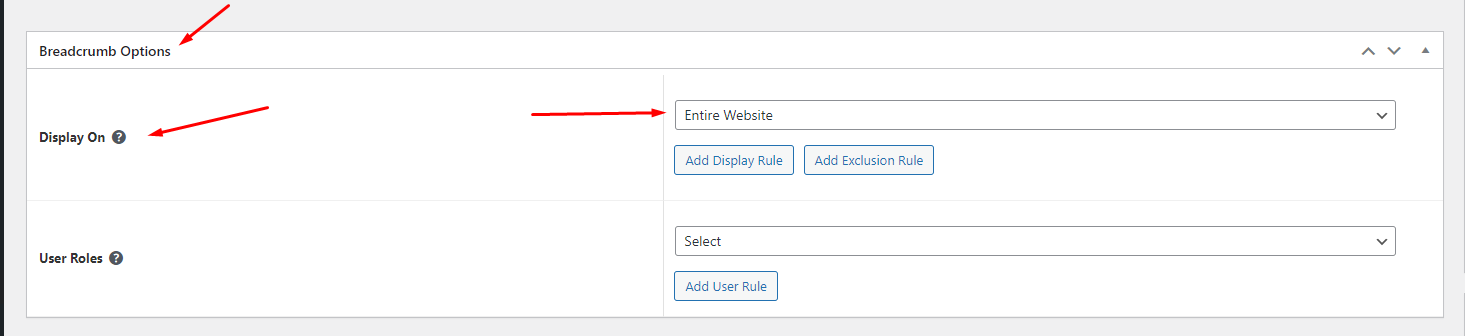
* &#x20;Choose tab **Breadcrumb** and you can add the template that has been created to the page.

<figure><img src="https://1317622182-files.gitbook.io/~/files/v0/b/gitbook-x-prod.appspot.com/o/spaces%2FHaJY7xtpjFYpIG1vHKlm%2Fuploads%2F0CPE54LHZPPUDd3pza7W%2FScreenshot%202025-09-23%20at%2016.07.37.png?alt=media&#x26;token=32a4e279-42a8-4d6e-9abe-3addd3da4668" alt=""><figcaption></figcaption></figure>

* Edit the display of your Breadcrumb Template that can add the created template to the page.

<figure><img src="https://content.gitbook.com/content/HaJY7xtpjFYpIG1vHKlm/blobs/GsgVpqZv65Zm3zpSrslx/Screenshot_7.png" alt=""><figcaption></figcaption></figure>

**Step 5** Click SAVE & CLOSE

After all, click **"Update"** for settings.