# Breadcrumb

**Step 1** Go to WordPress Dashboard > Appearance > Breadcrumb > Add New

<figure><img src="https://1557478111-files.gitbook.io/~/files/v0/b/gitbook-x-prod.appspot.com/o/spaces%2FMyoctrRen0RMX7ECZ22k%2Fuploads%2FegLy3xvDcrdIYiIIAPNk%2Fimage.png?alt=media&#x26;token=9716610e-7167-499e-94c0-049c131f1b15" alt=""><figcaption></figcaption></figure>

<figure><img src="https://1557478111-files.gitbook.io/~/files/v0/b/gitbook-x-prod.appspot.com/o/spaces%2FMyoctrRen0RMX7ECZ22k%2Fuploads%2F5fXZut5l8RwgfDOQjSwv%2Fimage.png?alt=media&#x26;token=f1eff41d-b0b2-4690-b0bc-722ddbe04869" alt=""><figcaption></figcaption></figure>

<figure><img src="https://1557478111-files.gitbook.io/~/files/v0/b/gitbook-x-prod.appspot.com/o/spaces%2FMyoctrRen0RMX7ECZ22k%2Fuploads%2FbbWSyg4qtdKTJEFXLtfA%2Fimage.png?alt=media&#x26;token=ffe9f477-81e3-45b8-a6ce-f0c0b919ebab" alt=""><figcaption></figcaption></figure>

**Step 2** Click ‘Add New ’ and Name your Breadcrumb template and click ‘Create Breadcrumb’ and 'update'.

<figure><img src="https://1557478111-files.gitbook.io/~/files/v0/b/gitbook-x-prod.appspot.com/o/spaces%2FMyoctrRen0RMX7ECZ22k%2Fuploads%2F3omSMzUDTUD36LbWALuq%2Fimage.png?alt=media&#x26;token=bcd01b44-bd81-491f-9ff6-b1107af10594" alt=""><figcaption></figcaption></figure>

<figure><img src="https://1557478111-files.gitbook.io/~/files/v0/b/gitbook-x-prod.appspot.com/o/spaces%2FMyoctrRen0RMX7ECZ22k%2Fuploads%2FmvYok4v1FjcN5kfYapD5%2FScreenshot%202024-12-24%20at%2009.35.02.png?alt=media&#x26;token=28c053c1-c015-41f1-bf1a-b4d88f14af3b" alt=""><figcaption></figcaption></figure>

**Step 3** - Drag or drop  the element that you want to build your template style with a limited layout

You can add "Guzal Breadcrumb"

<figure><img src="https://1557478111-files.gitbook.io/~/files/v0/b/gitbook-x-prod.appspot.com/o/spaces%2FMyoctrRen0RMX7ECZ22k%2Fuploads%2F8ppX5ZVpe3rgCFWCbQ6G%2FScreenshot%202024-12-24%20at%2009.35.48.png?alt=media&#x26;token=bdb11e73-ddc9-4e74-8752-7a265af4516b" alt=""><figcaption></figcaption></figure>

After all, click **"Update"** for settings.

**Step 4 - Set up Breadcrumb**

* &#x20;Choose tab **Breadcrumb** and you can add the template that has been created to the page.

<figure><img src="https://1557478111-files.gitbook.io/~/files/v0/b/gitbook-x-prod.appspot.com/o/spaces%2FMyoctrRen0RMX7ECZ22k%2Fuploads%2F20JXNZAajsBIZVWvkayW%2Fimage.png?alt=media&#x26;token=a52841c1-2704-4092-9a42-9f0a876b3815" alt=""><figcaption></figcaption></figure>

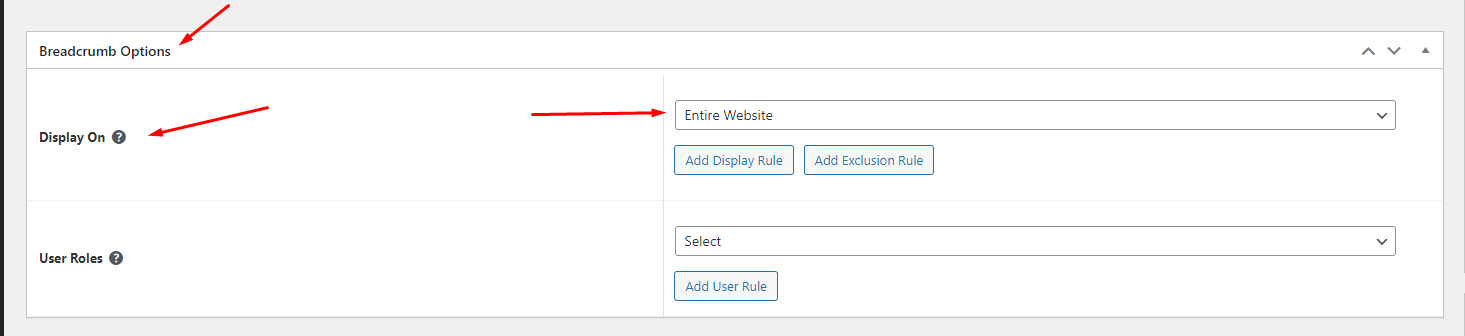
* Edit the display of your Breadcrumb Template that can add the created template to the page.

<figure><img src="https://content.gitbook.com/content/MyoctrRen0RMX7ECZ22k/blobs/zTWEOJOyeTTttA5ltJ5g/Screenshot_7.png" alt=""><figcaption></figcaption></figure>

**Step 5** Click SAVE & CLOSE

After all, click **"Update"** for settings.