# Button

**Step 1** - you can go to any elementor edit page.

![](https://gblobscdn.gitbook.com/assets%2F-MHy5dy5uQ67W56zMcvB%2F-MHyl5tKwxIFMrcOFEGL%2F-MHylCQG8lFl_ND3H8Om%2Fimage.png?alt=media\&token=2f10648c-373f-4f17-83a7-655815f0239f)

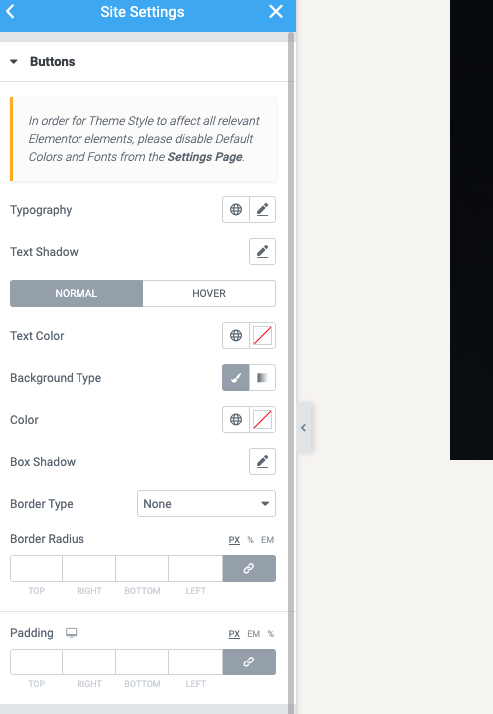
**Step 2** - Site Settings >> Button >>

<figure><img src="https://content.gitbook.com/content/5hnNE6usDlrecg9eAq2i/blobs/1nbX5OwFfURQHuy8TIV6/Screenshot%20at%20Sep%2024%2014-57-19.png" alt=""><figcaption></figcaption></figure>

**Step 3** - Settings Button for your site

**The Front end looks like**&#x20;

<figure><img src="https://342754974-files.gitbook.io/~/files/v0/b/gitbook-x-prod.appspot.com/o/spaces%2F5hnNE6usDlrecg9eAq2i%2Fuploads%2F1ufgyhVmIfkD9YFhZ19D%2FScreenshot%20at%20Aug%2014%2017-25-24.png?alt=media&#x26;token=94316757-c690-45c9-8c34-f6f8c95dea75" alt=""><figcaption></figcaption></figure>