# Logo

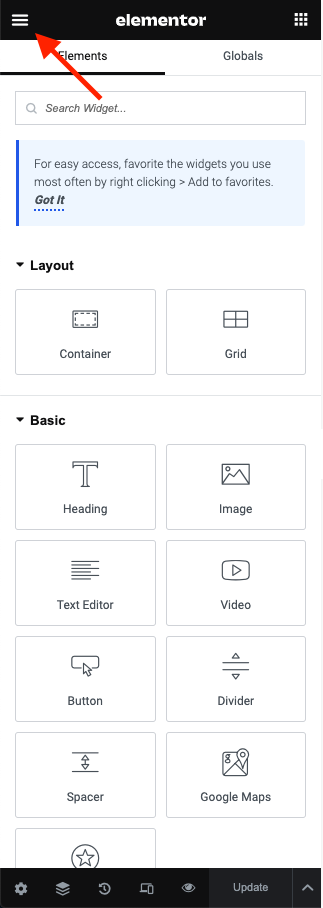
**Step 1** - You can go to any Element or edit page.

<figure><img src="https://content.gitbook.com/content/qxLOC8JSAtFd1NqUHyOc/blobs/sMtIF22XxqMvToX3cNg8/image.png" alt=""><figcaption></figcaption></figure>

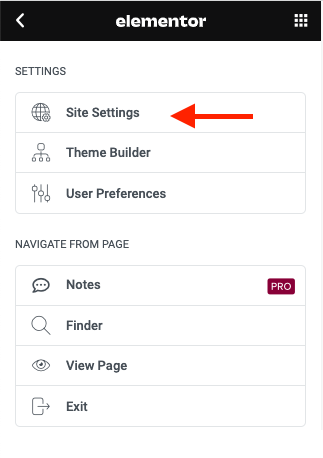
**Step 2** - Site Settings -> Layout

<figure><img src="https://content.gitbook.com/content/qxLOC8JSAtFd1NqUHyOc/blobs/VAMTdRr2P8oWjP6KrCuN/image.png" alt=""><figcaption></figcaption></figure>

<figure><img src="https://1429332211-files.gitbook.io/~/files/v0/b/gitbook-x-prod.appspot.com/o/spaces%2FqxLOC8JSAtFd1NqUHyOc%2Fuploads%2Fnzu0vwRPYweJGuFJ5UCN%2FScreen%20Shot%202024-10-07%20at%202.47.55%20PM.png?alt=media&#x26;token=c0ee1d7d-f015-472b-8ec9-dddb93990a8d" alt=""><figcaption></figcaption></figure>

**Step 3** - Setting logo for your site

<figure><img src="https://1429332211-files.gitbook.io/~/files/v0/b/gitbook-x-prod.appspot.com/o/spaces%2FqxLOC8JSAtFd1NqUHyOc%2Fuploads%2FMwQxepPy5GPLTN2PceUf%2FScreen%20Shot%202024-10-07%20at%202.48.43%20PM.png?alt=media&#x26;token=9f2007a6-612e-4db0-9bf4-3ddbeff7faed" alt=""><figcaption></figcaption></figure>

Then click "Save & Publish" for settings.