> For the complete documentation index, see [llms.txt](https://wpdocs.gitbook.io/artfusy/llms.txt). Markdown versions of documentation pages are available by appending `.md` to page URLs; this page is available as [Markdown](https://wpdocs.gitbook.io/artfusy/setting-1/typography.md).

# Typography

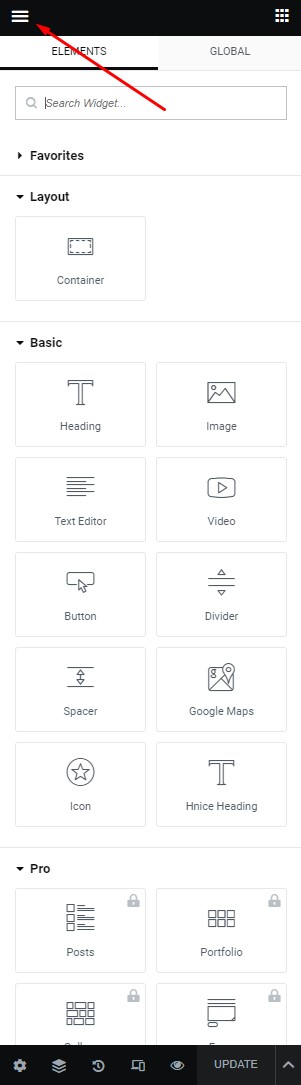
**Step 1** - you can go to any elementor edit page.

<figure><img src="https://1978458441-files.gitbook.io/~/files/v0/b/gitbook-x-prod.appspot.com/o/spaces%2FSfa4tIVlr7SD4DV7IMPn%2Fuploads%2FNzEz1MVxqKQodBUfPBhk%2Flayout1.jpg?alt=media&amp;token=82f89bac-f64d-4256-a588-2757ee97095d" alt=""><figcaption></figcaption></figure>

**Step 2** - Site Settings >> Typography >>

<figure><img src="https://1978458441-files.gitbook.io/~/files/v0/b/gitbook-x-prod.appspot.com/o/spaces%2FSfa4tIVlr7SD4DV7IMPn%2Fuploads%2FStmHxerPbrZpEytBlt4U%2FScreenshot%202023-04-26%20at%2010.38.45.png?alt=media&amp;token=bb14e934-ff3f-41f2-a521-2845f38ff05f" alt=""><figcaption></figcaption></figure>

**Step 3** - Settings Typography for your site

<figure><img src="https://1978458441-files.gitbook.io/~/files/v0/b/gitbook-x-prod.appspot.com/o/spaces%2FSfa4tIVlr7SD4DV7IMPn%2Fuploads%2Fh7ZnynktzcysDN4Kc3cy%2FScreenshot%202023-04-26%20at%2010.42.14.png?alt=media&amp;token=97efd109-b23a-4e11-927f-c2a705df771f" alt=""><figcaption></figcaption></figure>

Then click "Save & Publish" for settings.
​
