> For the complete documentation index, see [llms.txt](https://wpdocs.gitbook.io/anila/llms.txt). Markdown versions of documentation pages are available by appending `.md` to page URLs; this page is available as [Markdown](https://wpdocs.gitbook.io/anila/setting/breadcrumb.md).

# Breadcrumb

**Step 1** Go to WordPress Dashboard > Appearance > Breadcrumb > Add New

<figure><img src="https://3750492702-files.gitbook.io/~/files/v0/b/gitbook-x-prod.appspot.com/o/spaces%2FXBaHzdAltWNLiqWbn5ZX%2Fuploads%2FPgM7LttbGxADRXwiJxbg%2FScreenshot%202024-09-25%20at%2014.24.19.png?alt=media&amp;token=f2eb57e4-4421-4179-a966-05e1721dcca6" alt=""><figcaption></figcaption></figure>

<figure><img src="https://3750492702-files.gitbook.io/~/files/v0/b/gitbook-x-prod.appspot.com/o/spaces%2FXBaHzdAltWNLiqWbn5ZX%2Fuploads%2Fqk2Jc4QYmY5H6nFPMeGI%2FScreenshot%202024-09-25%20at%2014.24.48.png?alt=media&amp;token=fe24be92-f4cb-464b-b994-31e5d0c0710a" alt=""><figcaption></figcaption></figure>

<figure><img src="https://3750492702-files.gitbook.io/~/files/v0/b/gitbook-x-prod.appspot.com/o/spaces%2FXBaHzdAltWNLiqWbn5ZX%2Fuploads%2F14VNWqQrrUSDwRnHDVLo%2FScreenshot%202024-09-25%20at%2014.25.23.png?alt=media&amp;token=1a4d9fa7-d27e-446d-8c6b-12fa9d68bde7" alt=""><figcaption></figcaption></figure>

**Step 2** Click ‘Add New ’ and Name your Breadcrumb template and click ‘Create Breadcrumb’ and 'update'.

<figure><img src="https://3750492702-files.gitbook.io/~/files/v0/b/gitbook-x-prod.appspot.com/o/spaces%2FXBaHzdAltWNLiqWbn5ZX%2Fuploads%2FuFwXYYNBPk6OSfK1JPEX%2FScreenshot%202024-09-20%20at%2017.17.45.png?alt=media&amp;token=ed6dfd79-7f8a-41e9-b0aa-1ec2ed8a6072" alt=""><figcaption></figcaption></figure>

<figure><img src="https://3750492702-files.gitbook.io/~/files/v0/b/gitbook-x-prod.appspot.com/o/spaces%2FXBaHzdAltWNLiqWbn5ZX%2Fuploads%2FyjkRuydkVxPxDX62UzrQ%2FScreenshot%202024-09-20%20at%2017.18.20.png?alt=media&amp;token=b76c3f49-5b57-479b-9a0b-4d469ea72a51" alt=""><figcaption></figcaption></figure>

**Step 3** - Drag or drop  the element that you want to build your template style with a limited layout

You can add "Anila Breadcrumb"

<figure><img src="https://3750492702-files.gitbook.io/~/files/v0/b/gitbook-x-prod.appspot.com/o/spaces%2FXBaHzdAltWNLiqWbn5ZX%2Fuploads%2FMKjHcbc97UvlDBEeDqWh%2FScreenshot%202024-09-20%20at%2017.18.53.png?alt=media&amp;token=16c706ca-3c88-4172-a9e2-631cf948b4c8" alt=""><figcaption></figcaption></figure>

After all, click **"Update"** for settings.

**Step 4 - Set up Breadcrumb**

* &#x20;Choose tab **Breadcrumb** and you can add the template that has been created to the page.

<figure><img src="https://3750492702-files.gitbook.io/~/files/v0/b/gitbook-x-prod.appspot.com/o/spaces%2FXBaHzdAltWNLiqWbn5ZX%2Fuploads%2F80Z1ZMbTmKIijK6YlsDB%2Fimage.png?alt=media&amp;token=2e3b0451-1ef1-4428-9561-212c77887c6b" alt=""><figcaption></figcaption></figure>

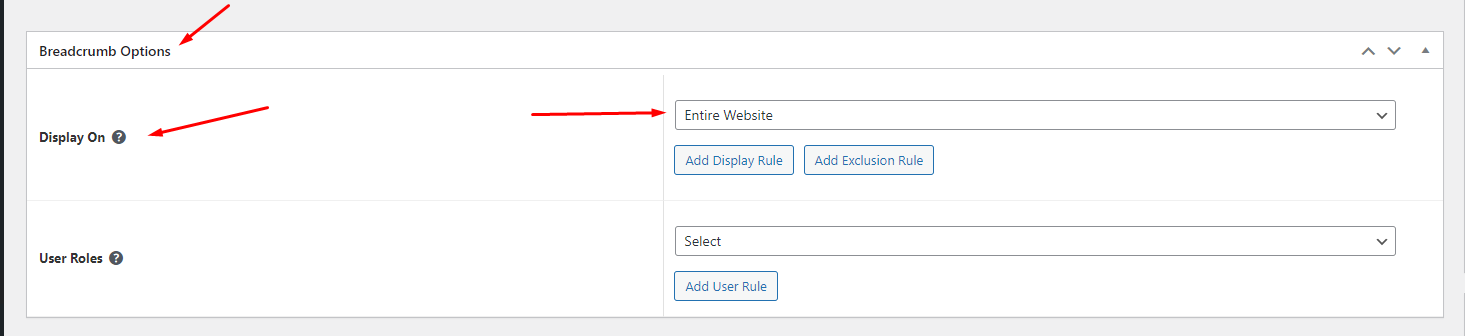
* Edit the display of your Breadcrumb Template that can add the created template to the page.
<figure><img src="https://content.gitbook.com/content/XBaHzdAltWNLiqWbn5ZX/blobs/bYoHtnWjaQGepQjfeVlH/Screenshot_7.png" alt=""><figcaption></figcaption></figure>

**Step 5** Click SAVE & CLOSE

After all, click **"Update"** for settings.
